How to Choose an OnlyFans CRM: A Practical Guide for Creators and Agencies
Choose an OnlyFans CRM with a practical checklist for inbox workflows, permissions, reporting, costs, and a controlled migration.
Affiliate disclosure: This guide contains affiliate links. OFToolbox may earn a commission if you sign up through them. Recommendations below are evaluation criteria, not promises of earnings or claims of hands-on testing. Read our affiliate disclosure for details.
An OnlyFans CRM should make your working day easier to understand. You should know which conversations need attention, what your team can access, and whether the work is producing useful results. A dashboard full of charts is less valuable if you still need three spreadsheets and a private message thread to figure out what happened yesterday.
The right choice depends on your operation. A solo creator answering messages between shoots has different needs from an agency coordinating several approved assistants. Before comparing software, write down the problem that made you start looking. If you cannot describe that problem in a sentence, begin with a workflow review rather than another subscription.
This guide explains how to build a shortlist, test the features that matter, and migrate with fewer surprises. You can explore the OFToolbox OnlyFans CRM directory alongside it, but make your decision against your own requirements rather than the longest feature list.
1. Define the job your CRM needs to do
Start with one week of ordinary work. Record where you lose time: finding previous messages, locating media, answering the same administrative questions, reconciling sales, or handing a conversation to another team member. Separate frequent annoyances from occasional problems. A small delay repeated fifty times each day can matter more than a complicated task you perform monthly.
Next, decide which outcomes would justify a change. Useful targets include fewer missed follow-ups, a shorter daily reporting routine, clearer ownership of conversations, or faster access removal when a contractor leaves. Choose targets you can observe without collecting unnecessary personal information. You do not need a detailed profile of every subscriber to improve your inbox organization.
Put your requirements into three groups: essential, useful, and optional. Essential features should relate directly to your current workflow. Optional features should not become essential just because a demo makes them look impressive. A product can be excellent and still be more complicated than your business needs today.
2. Decide whether you need a CRM at all
If you work alone, have a manageable inbox, and can keep reliable records with native tools, a dedicated CRM may be premature. Improving your folder names and daily routine could solve the immediate issue. Paying for software before you understand your process often gives you a faster way to repeat a confusing process.
A CRM becomes easier to justify when coordination is the bottleneck. Perhaps two assistants need a clear handover, or you repeatedly lose track of which campaign a subscriber came from. In those cases, the software is supporting a defined operational need. That gives you a more useful trial than simply exploring every available menu.
Write down what you would keep doing without the software. This fallback is valuable even after purchase. If the provider has an outage, you should still know how to access the platform through permitted channels, record outstanding commitments, and communicate with your team. Your business routine should remain understandable without a particular dashboard.
3. Build a small, relevant shortlist
Limit the first comparison to two or three providers. A larger shortlist creates more setup work and makes it harder to remember meaningful differences. Look for current documentation, a clear support route, and enough information to understand the proposed account connection. Confirm that the tool’s access method and intended use fit the platform’s current terms.
Two starting points already listed in OFToolbox are Infloww and FansMetric. These are affiliate links. Include either only if its current product matches your requirements, and compare it with other options in the directory rather than assuming one product fits everyone.
According to Infloww’s product information, its offering includes messaging, media management, and reporting tools. FansMetric’s own website describes CRM, analytics, and agency operations capabilities. These descriptions identify candidates to investigate; they do not establish which service will work best for your account or demonstrate any likely revenue result.
4. Test the inbox with realistic scenarios
An inbox demo should resemble your working day. Prepare a short list of ordinary situations: finding a previous conversation, seeing whether a follow-up is outstanding, locating an approved response, and handing an unresolved question to the account owner. Use synthetic examples or appropriately authorized data wherever possible during an initial demonstration.
Evaluate the number of decisions each task requires. A screen that saves one click but adds three ambiguous icons may not improve your routine. Check whether labels are readable, filters are easy to reset, and a teammate can tell which account they are working on. Account confusion is especially costly when several creators use similar campaign names.
Also check how the product handles interruption. If you switch tabs, refresh the page, or move to another conversation, can you recover your place? Ask what happens to drafts and unsent attachments. These small details affect daily work more than a polished overview screen, especially when someone is working through a busy shift.
5. Treat permissions as a buying criterion
Create a simple access matrix before the trial. List roles down one side and tasks across the top: reading messages, sending approved replies, viewing earnings, changing account settings, exporting information, and administering users. Grant access according to the work a person actually performs. Avoid giving everyone administrative rights just to simplify onboarding.
Ask the provider to demonstrate your matrix with an actual restricted test account. Do not rely solely on a screenshot of a settings panel. Sign in as the restricted user and confirm which information is visible. Check whether changing a permission affects existing sessions and whether access removal also covers linked devices or shared profiles.
Infloww publishes a guide to assistant role permissions. Use provider documentation like this to prepare specific questions, then confirm the current behavior in your chosen plan. Your own access policy should remain clear even if a vendor renames its roles or reorganizes the settings screen.
6. Review media organization before moving files
A useful media library should reduce uncertainty about what an asset is and where it may be used. Begin with a naming system that distinguishes public promotional material from subscriber content, drafts from approved versions, and current campaigns from archives. Software cannot repair a library where every folder contains a different interpretation of “final.”
During evaluation, upload a small authorized sample. Check whether filenames remain recognizable, thumbnails are practical, and different team members can find the same item. Test both the common path and the awkward one: replacing an old version, removing an accidental duplicate, or locating an asset with a similar name.
Keep original files and working records somewhere you control. Before moving a substantial library, understand the provider’s export process and any relevant limits. Store permissions and consent records separately from promotional labels. Being able to find a video quickly is useful; knowing whether you are authorized to publish that specific version is essential.
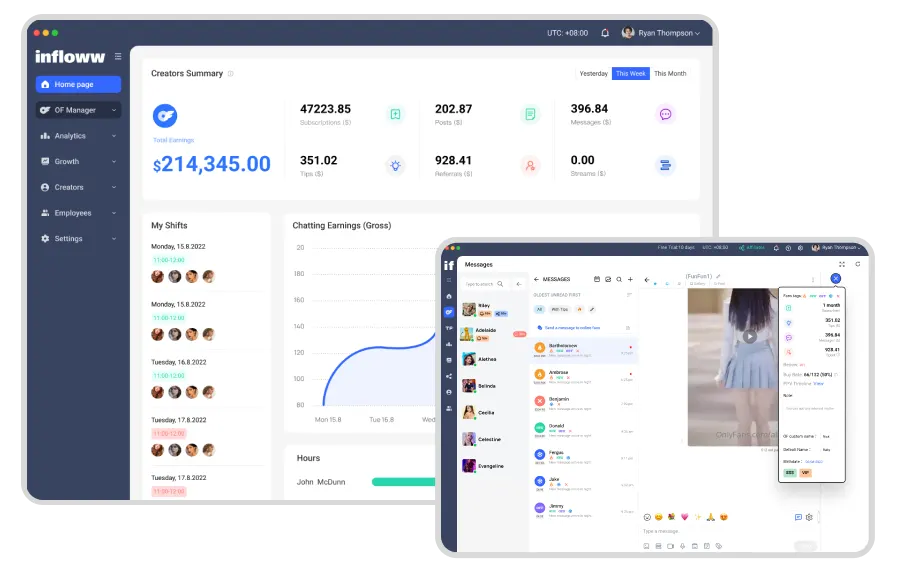
Interface reference from the OFToolbox image library. Product layouts and feature availability can change.
7. Compare reporting definitions, not just charts
Two dashboards can show different totals without either being broken. They may use different time zones, update intervals, account scopes, or treatments of refunds. Before comparing numbers, ask what each metric includes and when it refreshes. Save these definitions alongside your reporting template so your team does not reinterpret them every week.
Choose a small set of operational measures. For example, track outstanding follow-ups, campaign link results where supported, and time spent preparing reports. If you use revenue figures, distinguish gross receipts from the amount remaining after relevant costs. More activity is not automatically more value, and a larger number of messages is not inherently better service.
Reconcile one sample period against the original platform records. Investigate material differences before making staffing or campaign decisions. Avoid building compensation rules around a metric you do not understand. Reporting is most useful when it supports a fair, repeatable decision, rather than rewarding whichever behavior increases a visible counter.
8. Calculate the full cost of switching
Subscription price is only one part of the decision. Add setup time, training, any required supplementary tools, and the time needed to maintain the system. Ask how charges change with account count, seats, earnings, or usage. Confirm renewal and cancellation terms directly because plan details can change after an article is written.
Use a simple evaluation worksheet. Record the monthly subscription, expected administration time, tasks the tool replaces, and features you will actually use. Treat estimated time savings as a hypothesis until measured. A provider’s strongest marketing example should not become your financial forecast, especially if your team size and workflow are very different.
Set a review date before subscribing. At that review, compare the original problem with the result. If the tool saves little time and introduces extra steps, simplify the configuration or reconsider the purchase. A subscription should earn its place in your stack through useful work, rather than remain because onboarding once felt inconvenient.
9. Run a controlled trial
Choose one account or one narrow workflow for the trial, with the creator’s authorization. Keep the rest of your process stable. If you change your prices, posting routine, promotional channels, and CRM at the same time, you will struggle to identify which change helped or caused a problem.
Give the trial an owner and an end date. Record issues as they occur, including the steps needed to reproduce them. Separate product defects from unfamiliarity and configuration mistakes. Ask support to resolve an ordinary operational question during the trial; the clarity of its response is useful information about the service you may depend on later.
End with a short decision document. Explain whether the essentials passed, what remains uncertain, what the ongoing cost will be, and how you would leave. A documented “no” is a successful trial if it prevents an unsuitable commitment. The goal is a better operating process, not proving that your initial shortlist was correct.
10. Plan migration and team training
Before switching, preserve the records you are authorized to retain and identify any outstanding commitments. Choose a quiet period and tell the team which system is the source of truth during the transition. Avoid having two people independently update different copies of the same campaign notes without a reconciliation plan.
Train by task rather than by menu. Show how to begin a shift, find approved material, record a handover, escalate a sensitive question, and end a shift. Give each role a short checklist. People are more likely to follow a practical one-page routine than remember an hour-long tour of every available feature.
After launch, review access, reporting, and library structure within the first week. Remove temporary permissions used during setup. Revisit the workflow after the first full reporting cycle and record any adjustments. Your CRM should support a process that improves over time without requiring constant improvisation from everyone using it.
Ask support a question you cannot answer from the demo
Bring one real edge case to the provider before buying. For example, ask how you would recover an exported report after a teammate loses access, or how the system identifies a conversation reassigned midway through a shift. A useful response should explain the supported behavior and its limitations. It should not require you to infer the answer from a generic list of features.
Save the response with your evaluation notes. If support describes a planned feature, distinguish it from something available now. Build the purchase decision around current capabilities, and treat future improvements as uncertain until delivered. This keeps your operational expectations realistic and gives a new teammate a clearer explanation of why the product was selected.
A practical CRM decision checklist
Before you commit, confirm that you can answer these questions in plain language:
- What recurring problem does the product solve for this account?
- Which features are essential, and which can wait?
- Who can see messages, earnings, settings, and exports?
- How do you remove access and recover from an outage?
- Which reporting definitions match your own records?
- What does the service cost at your expected usage?
- Can you retrieve the information you need if you leave?
For a solo creator, the best outcome may be a modest system with clear notes and very little administration. For a larger team, a more capable CRM may justify its complexity through better coordination. Both outcomes are reasonable. The purchase should reflect the work you have, rather than the operation you imagine running someday.
Continue with our creator automation guide if your biggest problem is repetitive administration. If traffic measurement is the missing piece, read the link-in-bio conversion guide. A CRM works best when it fits a coherent workflow, a clear measurement routine, and sensible boundaries around account access.
If you enjoyed this post, please help us by sharing it with others.

Learn how to promote OnlyFans on Reddit effectively. Discover UpvoteGG, a Telegram bot for buying Reddit upvotes to boost your reach fast.
17 Feb 2026 • 4 min read
Organize creator account security with stronger logins, controlled team access, safer file sharing, recovery planning, and a practical monthly review.
18 Oct 2026 • 11 min read