OnlyFans Account Security: A Practical Access Checklist for Creators and Teams
Organize creator account security with stronger logins, controlled team access, safer file sharing, recovery planning, and a practical monthly review.
Affiliate disclosure: This guide contains an affiliate link to a tool listed in OFToolbox. We may earn a commission from a qualifying signup. A tool recommendation is not a guarantee of security. See the affiliate disclosure for details.
An account security problem rarely affects only one login. A creator may depend on a subscription platform, an email account, cloud storage, a link-in-bio service, scheduling tools, and several social profiles. If access to a central account is lost, the disruption can spread to publishing, communication, and recovery at the same time.
The most useful starting point is a clear map of ownership and access. You should know which accounts exist, who controls their recovery methods, and what a teammate is allowed to do. That foundation matters more than buying a specialist browser or adding another dashboard. Tools can support a good access process, but they cannot replace one.
This checklist focuses on practical account hygiene and authorized collaboration. It does not promise anonymity, prevent every attack, or provide a method for bypassing platform restrictions. Use the OFToolbox CRM directory and browser tools directory only after defining the operational problem you need to solve.
1. Make an account inventory
List the services your creator business uses. Include the public account name, owner, purpose, recovery email, authentication method, billing owner, and anyone with access. Store the inventory securely and keep passwords in a suitable password manager rather than in the same shared spreadsheet. The inventory should identify control relationships without becoming a bundle of credentials.
Pay special attention to accounts that can reset other accounts. Email is an obvious example, but a domain registrar or a shared cloud workspace may also have significant control over your business. Identify those dependencies so you can protect and recover them deliberately. A forgotten recovery address can undermine otherwise careful login practices.
Review the inventory whenever you add a service or change contractors. Assign a person to maintain it, even if that person is you. A record that was accurate six months ago may be misleading after a busy period of experiments. The goal is to understand the current access picture without reconstructing it during an emergency.
2. Strengthen the accounts that control recovery
Use unique passwords and a password manager to reduce reuse. Enable multifactor authentication where supported, and understand the options each provider offers. The practical point is to make a stolen password less useful and avoid a single reused credential exposing several services. CISA’s account safety guidance also emphasizes passwords, multifactor authentication, updates, and phishing awareness.
Make sure recovery information belongs to the creator or an explicitly authorized business owner. A temporary assistant’s personal email should not quietly become the only recovery route for a long-lived account. Document who can change those settings and how the owner will verify that a requested change is legitimate.
Store recovery codes securely and separately from an exposed working document. Confirm that you can retrieve them when your usual device is unavailable. You do not need to test destructive account recovery steps casually, but you should know the official process and where the required information is kept.
3. Separate ownership from day-to-day work
The person answering routine messages usually does not need to change billing, recovery details, or ownership settings. Define roles around actual duties. Keep the highest-impact permissions with the smallest practical group, and use individual authorized accounts or delegated access features where the service supports them.
Write a simple access request process. Record who requested access, which account or project it covers, what work requires it, and when it should end. A clear request helps the owner grant the right scope rather than use a broad invitation that is difficult to review later. Temporary work should have a temporary access plan.
If a service cannot provide the separation your team needs, treat that as a limitation to evaluate. Do not assume that a contractor’s good intentions eliminate the risk of accidental changes or a compromised device. You may need a different workflow, a narrower assignment, or a tool with appropriate delegation features.
4. Verify permissions from the restricted account
Permission labels can be ambiguous. After assigning a role, inspect the experience from a restricted test user or ask the provider to demonstrate it. Check which accounts, reports, files, and settings are visible. Confirm that the restriction applies to exports and shared views as well as the main dashboard.
For CRM-assisted collaboration, prepare an access matrix before comparing products. The CRM selection guide explains how to turn common tasks into test cases. A permission should correspond to a concrete business need, and the person granting it should be able to explain that need.
Recheck access after meaningful role changes. A person moving from editing to messaging may need different files and fewer settings. Avoid simply adding new permissions on top of every old role. Access tends to expand unless someone deliberately reviews what is no longer necessary.
5. Decide whether browser profiles solve a real problem
Separate browser profiles can help distinguish authorized work contexts and reduce accidental use of the wrong account. For some teams, ordinary browser profiles may be sufficient. A specialized product introduces another provider and another set of settings, so it should solve a defined coordination need rather than become a default purchase.
GoLogin is an affiliate-linked browser tool already listed in OFToolbox. Its official website describes isolated profiles and team access features. Evaluate the current implementation, data handling, and platform compatibility before adoption. Those features do not make an account immune to compromise or guarantee that every use is permitted.
Use any profile tool only for accounts you are authorized to manage. Do not treat fingerprint controls, proxies, or session sharing as a way to evade a suspension or disregard a service’s rules. The practical buying questions are about access control, revocation, session handling, and whether the tool makes legitimate work easier to supervise.
6. Treat devices and sessions as part of access
An authorized login on an unmanaged device can remain a risk after a password is set. Keep operating systems and browsers updated, use device locks, and review installed extensions. A browser extension may request access to information on pages you visit, so install only what you need and understand the permissions it requests.
Ask teammates how they separate personal browsing from work. Avoid conducting sensitive account administration on a casually shared device. If the team uses personal equipment, define the minimum expectations and what happens when a device is lost or replaced. A policy is useful only when the people following it understand the required actions.
Review active sessions using provider controls where available. Understand whether signing out or revoking a session affects all devices or only the current one. Removing a person from a team workspace may not automatically remove every previously shared session or exported file, so check the scope of each action rather than assuming complete revocation.
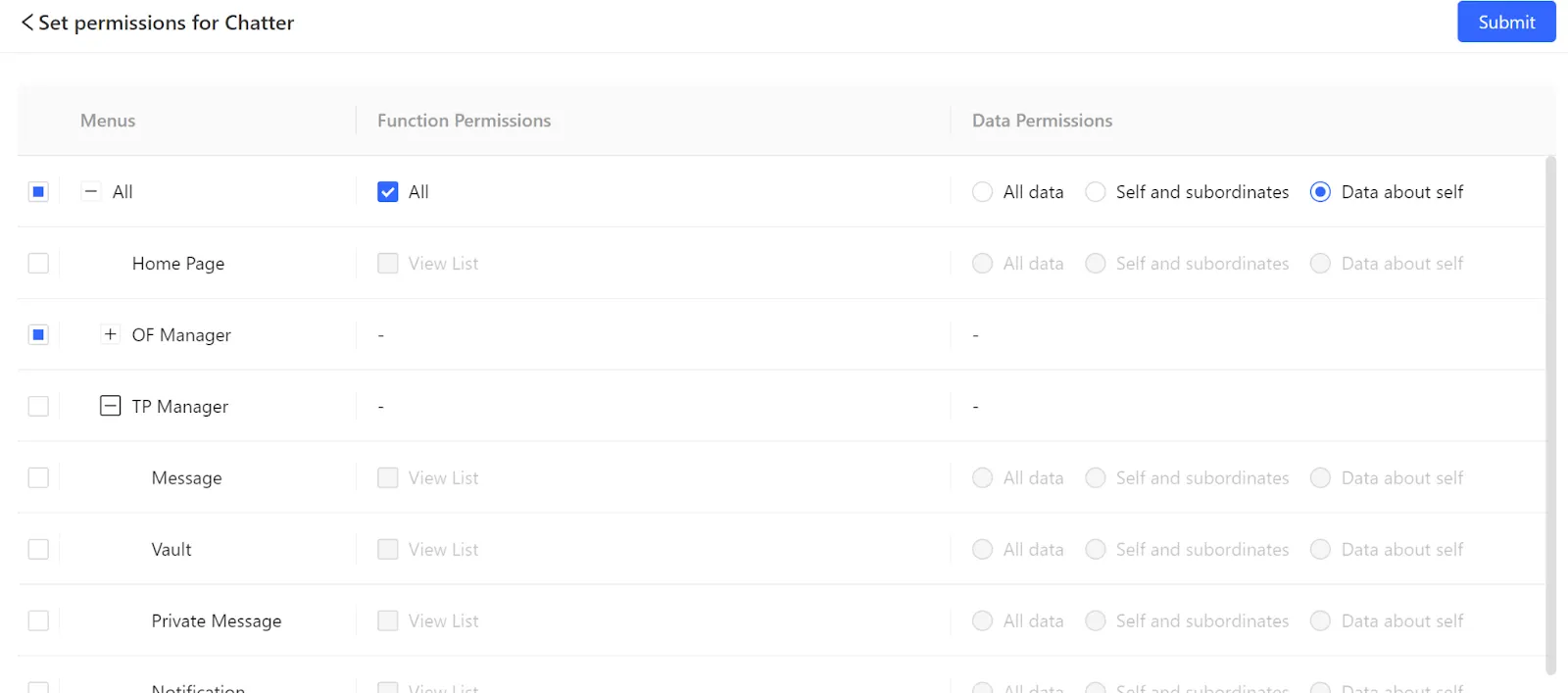
Historical interface reference from the OFToolbox library. Verify current permission names and behavior directly in the provider’s documentation.
7. Share files with deliberate boundaries
Use named access where practical instead of broad public links for working material. Give an editor the project folder they need rather than the complete archive. Set a review or expiration date for temporary sharing, and keep approved exports separate from source files. This reduces confusion as well as unnecessary exposure.
Before sharing, check the folder’s contents and inherited permissions. A tidy project name does not guarantee that the folder excludes unrelated material. Avoid including personal documents, recovery codes, financial records, or private conversation exports in the same shared location. Make the intended audience of the folder clear to anyone who can add files.
Keep rights and consent information available to the people who need it, with an appropriate access boundary. An editor may need to know that an asset is approved for a channel without receiving every underlying personal document. Design the workflow around the minimum information required to do the job correctly.
8. Recognize requests that deserve a pause
Unexpected urgency is a useful reason to verify a request. Someone claiming to be support may ask you to sign in through an unfamiliar page, install a remote-access tool, or disclose a verification code. Instead of using the supplied link, navigate to the service through your known bookmark and check its official support route.
The same principle applies to messages that appear to come from a colleague. If an unusual request involves credentials, ownership changes, or a large export, verify it through an established channel. Do not let a familiar profile picture substitute for confirmation. Teams should agree that a brief verification step is normal for high-impact actions.
Give contractors a way to report suspicious messages without embarrassment. A quick report is more useful than a hidden mistake. Keep the instructions short: stop interacting, preserve the relevant message details safely, tell the designated owner, and follow the service’s official reporting guidance. Avoid forwarding suspicious attachments around the team for curiosity.
9. Write a practical offboarding checklist
Offboarding begins with knowing which access exists. On the agreed end date, remove delegated roles, shared folders, project spaces, and relevant browser profiles. Review active sessions and any secrets that were directly shared. Rotate exposed credentials where appropriate and confirm that recovery details remain under the correct owner’s control.
Record completion without copying sensitive credentials into the checklist. The record should say which action was taken, when, and by whom. If a tool cannot immediately revoke a previously shared session, identify the official steps available and handle the limitation explicitly. Do not mark a task complete merely because an invitation disappeared from one screen.
Recover outstanding work and clarify file ownership before access ends when possible. The departing person should not be the only source of an approved caption, campaign note, or publication record. A good workflow keeps operational records in the business’s authorized workspace throughout the project, making departure less disruptive.
10. Prepare for an account incident
Create a short incident plan before you need it. Identify the account owner, official recovery routes, important dependencies, and the information you may need to provide. Keep a copy accessible through a safe route that does not depend entirely on the account most likely to be unavailable.
If you suspect compromise, use a trusted device and the provider’s official guidance. Review recovery settings, active sessions, connected applications, and recent changes as appropriate. Preserve relevant evidence without spreading private information unnecessarily. Prioritize restoring legitimate control and preventing further unauthorized access rather than improvising a confrontation with a suspected attacker.
After control is restored, review what actually happened. Was a reused password involved, a deceptive login page, an unrevoked session, or an overly broad role? Turn the finding into a concrete process change. Avoid blaming a person without understanding the access path; an unclear system can make similar mistakes likely for the next teammate.
11. Separate account protection from content monitoring
Protecting a login and monitoring unauthorized reposts are different tasks. Stronger access controls can reduce some exposure risks, but they cannot stop every recipient from copying material they can view. Keep original files and publication records organized so you can identify your own work and respond through appropriate reporting channels when necessary.
The content protection directory can help you explore monitoring and removal services. Evaluate what each provider actually searches, how it reports findings, and what authorization it requires. Do not assume that hiring a service removes every copy or guarantees a particular legal outcome.
Avoid visiting suspicious pages repeatedly from your main work environment or uploading private material to unknown “verification” services. Record the relevant location and use established reporting routes. For questions involving legal rights or disputes, obtain advice appropriate to the situation rather than relying on a software marketing claim.
Make security a routine you can maintain
Schedule a monthly review of the account inventory, team roles, recovery details, shared folders, and active integrations. Keep the review short enough that it happens. A small team might complete most checks in one session, while a larger agency may divide responsibility by system and require confirmation from each owner.
Choose one improvement from each review and give it a deadline. Removing an unused extension, correcting a recovery address, or narrowing an old contractor’s access can be more valuable than buying a new product. Security work should result in observable changes to the way accounts are controlled.
For the operational side, use our content workflow guide to keep approvals and assets organized. Then review the lean creator stack guide before adding more tools. A smaller, understood set of services is easier to administer than an expanding collection nobody can fully explain.
If you enjoyed this post, please help us by sharing it with others.

Choose an OnlyFans CRM with a practical checklist for inbox workflows, permissions, reporting, costs, and a controlled migration.
30 Sep 2026 • 12 min read
Build a repeatable creator workflow with content batching, approval gates, asset organization, and practical automation around your publishing process.
06 Oct 2026 • 12 min read